Help - Home
Choosing Your Libraries
You have the ability to customize the site by choosing which libraries to keep in your search scope. This will only affect your My Libraries search results.

To specify your library preferences:
- In the utility bar at the top of the screen, click on the My Libraries link.
- Under the Library Settings section, select/deselect titles and click the Apply button.

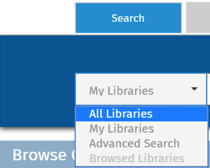
After you have finished customizing your Library Settings, click home and notice that you now have options for search:
- My Libraries – searches the libraries you’ve selected
- All Libraries – searches all libraries regardless of your selection
- Advanced Search – provides date, Boolean and other search options.
- Browsed Libraries – is used when you browse to a sub-section of content to search just within that neighborhood.